

- Published on
Vega 2.0 on Fire TV: What the React Native 0.83 Upgrade Means for TV App Teams
- Authors

- Name
- Davidson Simões
- @davidsonsimoes
- Occupation
Software Developer (BR) @ Davidson / W2BIT
Table of Contents
- 1 TL;DR
- 2 What Amazon shipped with Vega 2.0
- 3 Why the jump from React Native 0.72 to 0.83 matters
- 4 The breaking changes to check first
- 5 Known issues worth testing on real devices
- 6 AI-assisted migration with ADBT for AI
- 7 A practical upgrade plan
- 8 What this means for teams shipping on many TV platforms
- 9 FAQ
- 10 Sources
Amazon made Vega OS 2.0, Vega SDK 2.0 and its Vega developer tools generally available on October 29, 2026. For teams that ship React Native apps to Fire TV, the headline is the runtime: Vega apps move from React Native 0.72 to 0.83, an eleven-release jump that brings React 19, the React Compiler and Hermes v1. Apps still on 0.72 keep working through 2027, according to Amazon, so this is not an emergency. It is, however, the right moment to schedule the upgrade, because Vega now promises breaking changes only once a year.
TL;DR
- Vega 2.0 is out of beta. Vega OS 2.0 has rolled out to all Vega-powered Fire TV devices, and the SDK and developer tools are now generally available.
- React Native 0.83 is the new baseline. It adds React 19, the React Compiler (opt-in), Hermes v1 and React Native DevTools. New Vega projects default to 0.83.
- 0.72 apps are not cut off yet. Amazon says a React Native 0.72 app "will continue to work through 2027".
- Breaking changes are concentrated. Manifest OS versions, deep imports, two removed Amazon library forks and the end of experimental APIs are the items most likely to break a build.
- AI agents are part of the official path. Amazon Devices Builder Tools (ADBT) for AI plugs Fire TV workflows into coding agents such as Claude Code, Codex, Cursor and GitHub Copilot. Amazon's own migration time claims come from partner pilots and exclude testing.
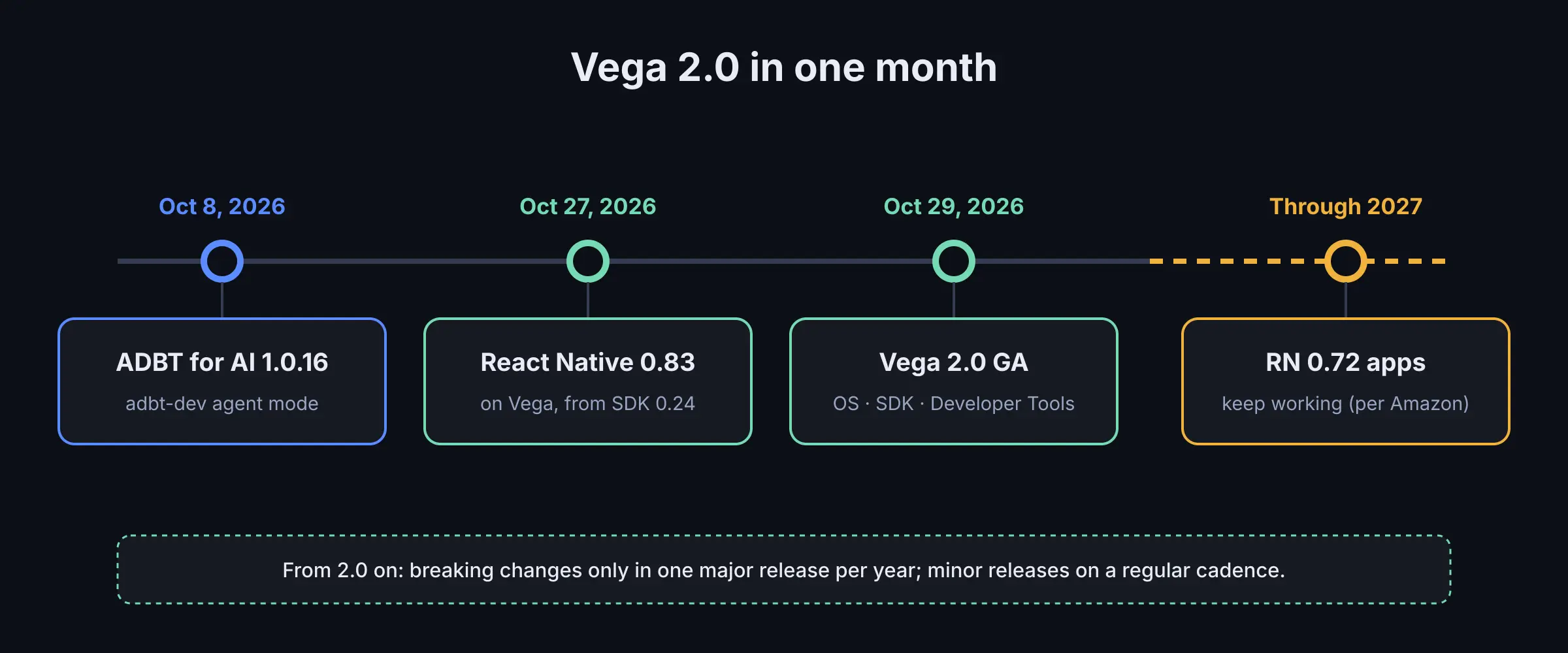
What Amazon shipped in October 2026, and how long React Native 0.72 apps keep working.
What Amazon shipped with Vega 2.0
Vega is the operating system Amazon uses on its newer Fire TV Sticks and on Echo devices. Amazon's announcement says it already runs on tens of millions of devices. With version 2.0, three things left open beta at the same time: the OS, the SDK and the advanced Vega Developer Tools.
The release notes list three Fire TV devices on OS 2.0: Fire TV Stick 4K (3rd Gen), Fire TV Stick HD and Fire TV Stick 4K Select. Amazon's Fire TV developer page still sends the other devices in the lineup, such as the Fire TV Stick 4K Max, Fire TV Cube and Fire TV smart TVs, to the Android-based Fire OS documentation. If you ship to Fire TV, you are still shipping to two operating systems.
The most important change for engineering planning is not a feature. Starting with 2.0, Amazon says the Vega API surface stays consistent across minor SDK releases and breaking changes are limited to one major release per year, with minor releases on a regular cadence. A predictable yearly break is something a team can put in a roadmap.
Why the jump from React Native 0.72 to 0.83 matters
Vega apps were built on React Native 0.72 until SDK 0.24. Amazon's React Native post calls the move to 0.83 a significant upgrade that spans eleven React Native releases. One part is easier than on other platforms: Vega has used React Native's New Architecture from the start, so there is no architecture migration. The rest is the usual work of a large upgrade: dependency versions, Babel and Metro configuration, renamed APIs and Vega-specific library versions.
What you get in return, according to Amazon:
- React 19 and the React Compiler. The compiler handles memoization at build time, so, according to Amazon, manual memoization is no longer needed. The upgrade does not turn it on; it is a separate Babel plugin (
babel-plugin-react-compiler) that you enable when you are ready. - Hermes v1. Amazon describes changes in how JavaScript is compiled and run on the device, aimed at work such as parsing large catalogue JSON, sorting and filtering rows and layout calculations. Its post cites upstream measurements by the React Native team on Expensify, a large production app, on a low-end Android device (3.2% faster bundle load, 7.6% faster time to interactive), and tells developers to measure their own apps.
- React Native DevTools. Components, Profiler and Network panels, opened from Metro.
- CSS-aligned styling. Alongside Yoga 3, a newer version of the layout engine, 0.83 adds style properties such as
boxShadowandoutline. Amazon calls out both for TV focus states, which are one of the most common pieces of custom styling in any 10-foot UI.
Our reading: for a TV app, the React Compiler and Hermes v1 are the parts most likely to show up for users, because TV hardware is constrained and catalogue screens re-render often. Neither gain is automatic: enable the compiler once the upgrade is stable, then profile the screens that matter.
The breaking changes to check first
The Vega 2.0 release notes list what changes for apps on React Native 0.83. These are the items most likely to break a build or a launch:
- OS version entries in the manifest. Builds now generate
[os.version]entries. Amazon's migration steps ask you to setminandtargetinmanifest.toml(most apps: both2.0) and to commit the manifest diff produced byvega project update-manifestinstead of restoring the removed module entries by hand. - Deep imports. Imports that reach into a library's internal paths no longer resolve. Top-level imports are unaffected. In Jest, mock internal modules instead.
- Two Amazon-packaged libraries are gone.
@amazon-devices/react-linear-gradientis removed; use theexperimental_backgroundImagestyle prop on aView.@amazon-devices/shopify__flash-listis not available on 0.83; use@shopify/flash-list. An app that still imports the old FlashList package fails at runtime. - Experimental APIs. SDK 0.24 deprecated them and SDK 2.0 no longer supports them. Amazon points to ADBT for AI 1.0.19 or later to find where you use them.
- TextInput submit behaviour (upcoming OS release). Single-line inputs without
submitBehaviorwill useblurAndSubmit. If your login or search screens treat everyonSubmitEditingas a submission, filter on the submit action.
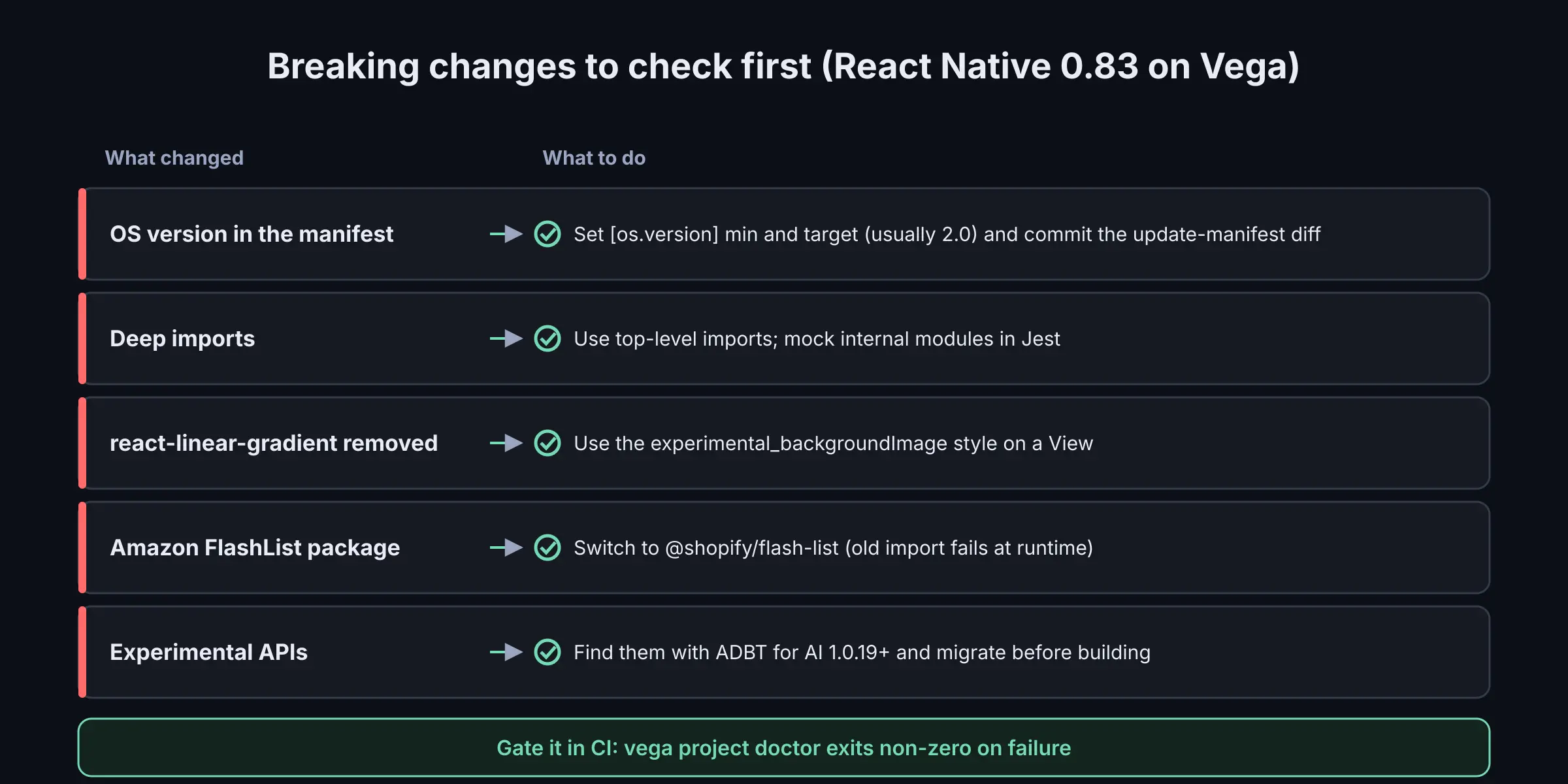
The five changes that most often break a React Native 0.83 build on Vega, and the fix for each.
The release notes also add a tool that belongs in continuous integration: vega project doctor checks JavaScript, TypeScript and native C/C++ code for compatibility and exits with a non-zero status on failure. For APIs that only exist on newer OS versions, Amazon recommends guarding calls with isPresentOnOS() or raising your min OS version.
Known issues worth testing on real devices
Some items in the known-issues list are the kind that only show up on hardware, which is why we would not sign off an upgrade on the Vega Virtual Device alone:
- A React Native 0.83 app can crash at launch if a dependency pulls in the 0.72 runtime. The most common cause, per Amazon, is
@amazon-devices/kepler-ui-components2.x; the documented workaround is upgrading to 3.0.0 or later. - The HEVC decoder is unavailable on the 2026 Fire TV Stick HD on OS 2.0. Check for HEVC support and fall back to H.264.
- There is no error event when a video decoder is missing; playback just keeps loading. Query media capabilities first.
- Large multi-period DASH manifests can freeze dash.js apps.
- PNG splash animations play at about 8 frames per second.
- Crash reporters such as Sentry cannot capture low-memory kills, because the process receives
SIGKILL.
For streaming apps, the playback items matter more than any API rename. A content library encoded mostly in HEVC needs an explicit H.264 path for the Stick HD before the upgrade ships.
AI-assisted migration with ADBT for AI
Amazon Devices Builder Tools (ADBT) for AI is a separate npm package, not part of the Vega SDK. It gives coding agents Fire TV context in three forms: an MCP server with tools such as Perfetto trace analysis, hot-function detection, documentation search and crash-report symbolication; Agent Skills, which are Markdown instruction sets for specific workflows; and steering documents that ground the agent in Amazon's practices. The CLI sets this up for Cursor, Claude Code, GitHub Copilot, Kiro, Cline, OpenCode, Codex, Gemini CLI or a custom host.
Since version 1.0.16 (October 8, 2026), ADBT can also install a dedicated adbt-dev agent that you call explicitly, instead of an always-on steering document. The same changelog post covers Chrome DevTools debugging for WebView apps (1.0.16), accessibility workflows switched on by default (1.0.13) and a Fire OS to Vega native migration workflow that targets React Native 0.83 (1.0.12).
Amazon's Vega 2.0 post reports what partners saw in early pilots: AI-assisted code migration from 0.72 to 0.83 completed in less than one day, excluding testing; a Fire OS app reaching an initial working Vega app within a week instead of months; feature integrations in days instead of weeks. The post's footnotes say results vary by app, task and agent, and that more development and testing may be needed before release.
Two details from the documentation are worth knowing before you install it. Documentation search queries are sent to Amazon, and anonymous telemetry is on until you turn it off. And switching to the adbt-dev agent removes the ADBT steering document, editing it in place if you added your own notes, so commit it first.
Our reading: treat the time claims as a hypothesis to test on a branch, not as an estimate to give a client. The claims exclude testing, and on TV, testing is where the time goes: focus behaviour, memory on the cheapest device, playback across codecs and store review.
A practical upgrade plan
This is the order we would follow for an existing React Native 0.72 app on Vega, combining Amazon's steps with what we have learned shipping TV apps:
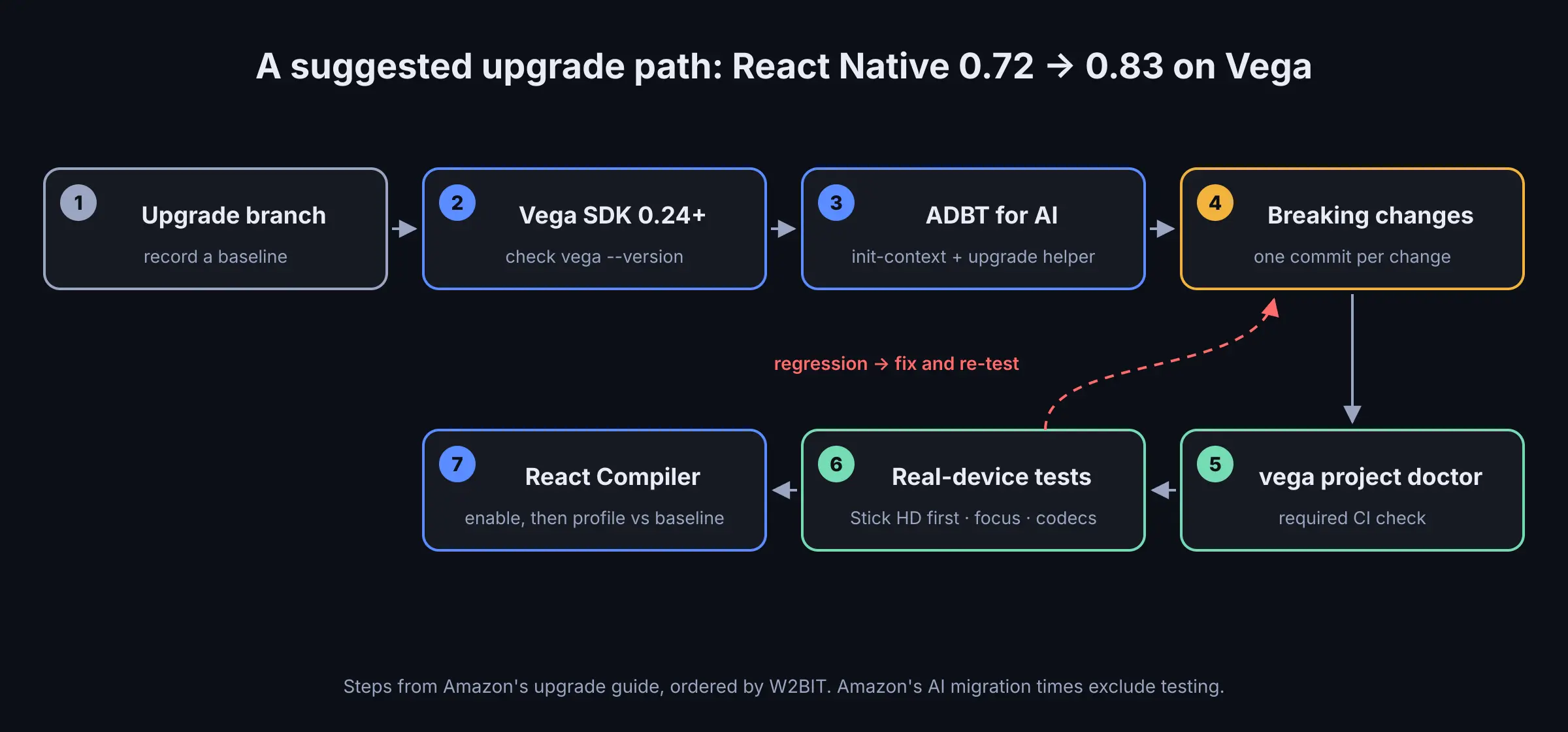
A suggested order for the upgrade. Device testing comes before enabling the React Compiler, so problems are easier to isolate.
- Create an upgrade branch and record a baseline: launch time, memory on the lowest-end Vega device you support, and a few critical flows.
- Install Vega SDK 0.24 or later and confirm it with
vega --version. - Set up ADBT for AI with
init-contextfor the agent your team already uses, and run Amazon's upgrade helper, which produces a to-do list of changes. - Work through the breaking changes above, one commit per change, so a regression can be traced.
- Add
vega project doctorto CI as a required check. - Test on real devices, starting with the Fire TV Stick HD: focus, playback (HEVC and H.264), deep links and memory. Confirm in Metro that the app runs on React Native 0.83.
- Only then enable the React Compiler, and profile the heaviest screens with React Native DevTools against your baseline.
If your Fire TV app shares React code with Samsung Tizen and LG webOS web apps, the CSS-aligned style properties in 0.83 make it easier to keep focus styles consistent across platforms. That is our interpretation, not an Amazon claim, and it is worth checking against your own design tokens.
What this means for teams shipping on many TV platforms
At W2BIT we build Smart TV apps with React and React Native, so the question we ask about any platform release is how much it costs to keep one product consistent across Tizen, webOS, Android TV, Fire TV and the rest. Vega 2.0 answers part of that. A modern React Native baseline and a once-a-year breaking-change window make Fire TV easier to plan for than a platform that changes underneath you every quarter.
It does not remove the split. Fire TV is now two operating systems with two app models, and Amazon's own pages still route most of the lineup to Fire OS. A realistic plan budgets for both: a React Native codebase for Vega, an Android build for Fire OS devices, and a yearly upgrade window that matches Amazon's major-release cadence.
FAQ
What is Vega 2.0 on Fire TV?
Vega 2.0 is the general availability release of Amazon's Vega OS, Vega SDK and Vega developer tools, announced on October 29, 2026. Vega OS 2.0 has rolled out to all Vega-powered Fire TV devices, and new Vega apps are built on React Native 0.83.
Do I have to migrate my Vega app from React Native 0.72 to 0.83 now?
Not immediately. Amazon says a React Native 0.72 app will continue to work through 2027, but it recommends migrating as soon as possible. New projects already default to 0.83, and Vega's yearly major release means a later upgrade will likely cover more changes at once.
Which Fire TV devices run Vega OS 2.0?
Amazon's release notes list the Fire TV Stick 4K (3rd Gen), Fire TV Stick HD and Fire TV Stick 4K Select on OS 2.0. Other devices, such as the Fire TV Stick 4K Max, Fire TV Cube and Fire TV smart TVs, are still documented under the Android-based Fire OS.
What is ADBT for AI?
Amazon Devices Builder Tools for AI is an npm package that gives coding agents Fire TV context through an MCP server, Agent Skills and steering documents. It supports agents such as Claude Code, Codex, Cursor, GitHub Copilot, Kiro and Gemini CLI, and includes workflows for the React Native 0.83 upgrade and for migrating Fire OS apps to Vega.
Sources
- Barak Schlosser, "Announcing Vega 2.0 general availability," Amazon Appstore Developer Blog, October 29, 2026. https://developer.amazon.com/apps-and-games/blogs/2026/10/vega-2-0-sdk-launch
- Anisha Malde, "React Native 0.83 for Vega OS," Amazon Appstore Developer Blog, October 27, 2026. https://developer.amazon.com/apps-and-games/blogs/2026/10/react-native-for-vega-os
- Amazon, "Vega 2.0 Release Notes" (documentation). https://developer.amazon.com/docs/vega/2.0/vega-release-notes
- Amazon, "Get started with Amazon Devices Builder Tools for AI" (documentation). https://developer.amazon.com/docs/adbt/get-started
- Amazon Developer Community, "Oct 8, 2026: ADBT AI — What's new," October 8, 2026. https://community.amazondeveloper.com/t/oct-8-2026-adbt-ai-whats-new/29704
- Amazon, "Fire TV" (developer page). https://developer.amazon.com/apps-and-games/fire-tv